Getting Started
SG-X is now the default solver in SPACE GASS. When you run an analysis, SG-X will be used automatically unless you explicitly select a different solver.
Selecting the Solver
To change the active solver, navigate to the analysis settings in SPACE GASS. You will see the following solver options:
- SG-X (default). The new multithreaded C++ solver.
- Paradise. The compressed stiffness matrix solver.
- Wavefront. The original frontwidth based solver.
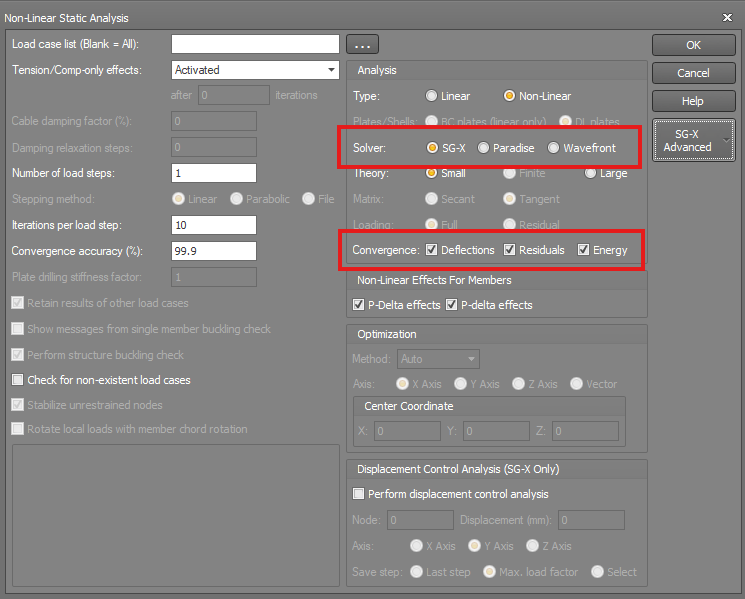
Convergence accuracy (%)
A single accuracy figure that sets how tight the iteration tolerance is. Internally the percentage is turned into a relative tolerance equal to (100 minus the accuracy) divided by 100. So the default of 99.9 % becomes a tolerance of 0.1 % (0.001): between one iteration and the next, the answer must change by less than one part in a thousand before the solver accepts it.
- A higher percentage (closer to 100) is a tighter, more accurate tolerance and usually needs more iterations to reach.
- A lower percentage is looser: the solver stops sooner, but the result is less precise.
The same accuracy figure is applied to whichever of the three criteria below are switched on.
tolerance = (100 − accuracy)/100 (the default 99.9 % gives a tolerance of 0.001, that is 0.1 %)
Convergence criteria: Deflections, Residuals, Energy
Three independent tests of whether the iteration has settled. Each tick adds one requirement that must be met. The three measure different things:
- Deflections. The change in the deflected shape from one iteration to the next must be small compared with the size of the deflections themselves. In plain terms: the structure has stopped moving between iterations.
- Residuals. The out of balance force, that is the difference between the applied load and the internal resistance the structure develops, must be small compared with the applied load. In plain terms: the structure is genuinely in equilibrium.
- Energy. The change in the potential energy of the structure from one iteration to the next must be small compared with that energy. This is a combined measure that blends the force and the deflection tests, and it makes a good general safety net.
How the criteria combine: When more than one box is ticked, the solver only declares success once all of the ticked criteria are satisfied at the same time. Ticking all three (the usual setting) is therefore the strictest and most reliable choice: the answer must pass the force check, the deflection check, and the energy check together before it is accepted. Unticking a criterion simply removes it from the test.
 If a model is struggling to converge, you have two levers here. You can loosen the accuracy a little (for example from 99.9 % to 99 %), or reduce how many criteria must be met. Both make convergence easier to reach, but both also reduce your confidence in the result, so use them with care and check the answer afterwards.
Compatibility
Existing SPACE GASS models do not require any modification to work with SG-X. Simply open your model and run the analysis: SG-X will produce results that are consistent with the previous solvers. If for any reason you wish to compare results between solvers, you can easily switch between SG-X, Paradise, and Wavefront from the analysis settings.